MAC_PICKER
MAC_PICKER - Ask the user to interactively enter a MAC via the UI
When to use it
Use MAC_PICKER any time a payload needs a MAC address, such as for a client or a BSSID.
Syntax
MAC_PICKER [text prompt] [default mac]
text prompt
Text prompt shown to user. Text prompts should be kept short enough to fit on the device display.
default mac
Default MAC address to pre-populate the picker.
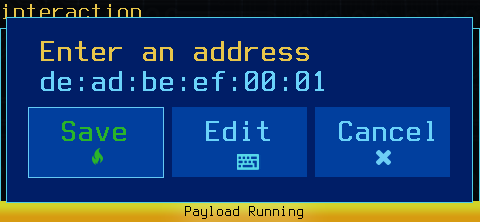
The IP picker dialog
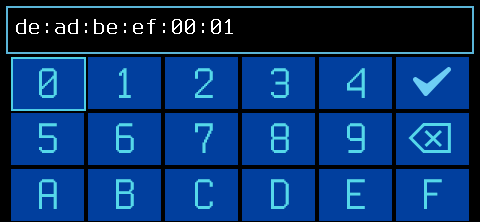
The IP picker editor
A default MAC should typically be provided. To prompt the user with no default, use a blank quoted string: "".
Results
MAC_PICKER will wait until the user has made a selection, pausing the payload.
MAC_PICKER exits with a return code of 0 if the user continues, and non-zero if the user cancels.
MAC_PICKER returns the MAC as the output.
Examples
__userip=$(MAC_PICKER "Target MAC" "00:DE:AD:BE:EF:00") || exit 0
__userip=$(MAC_PICKER "No default MAC" "") || exit 0
Remember to enclose the prompt text in quotes!