On this page
article
LOG
LOG - Send data to the payload console
When to use it
LOG is the primary way to show messages to the user about a paylaod in progress. Use it communicating the state of the payload shouldn’t pause the payload or interrupt the user.
Syntax
LOG {color} [message]
color (optional)
Set the color of the log message. The color may be any color name defined in the current theme.
message
Message to add to the payload log.
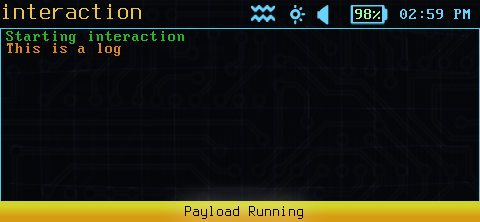
Example logging
Results
LOG sends a message to the payload console log, and returns immediately.
Examples
  LOG "Things are happening!"
LOG red "EXCITING things are happening!"
Remember to enclose the log text in quotes!