LIST_PICKER
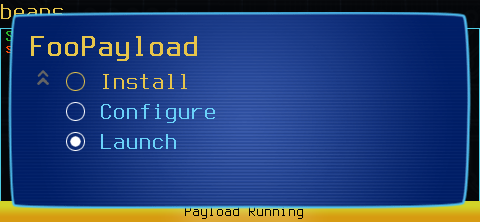
LIST_PICKER Prompt the user to interactively select from a list
When to use it
Use LIST_PICKER to prompt the user to perform different actions inside
your payload, such as installing, configuring, or running. You can also
use LIST_PICKER to present multiple options as results from a scan or
other interactive choices.
LIST_PICKER was added to the Pineapple Pager in firmware version
1.0.8. It will not be available on earlier firmware releases.
Syntax
LIST_PICKER [title] [option] [default]
title required
Prompt / dialog title. Titles should be kept short enough to fit on the device display.
option required
One or more options. Each option is shown as a separate list item. Options should always be protected by quotes.
default required
Default / preselected option.
Results
LIST_PICKER will wait until the user has made a selection, pausing the payload.
LIST_PICKER exits with a return code of 0 if the user continues, and non-zero if the user cancels.
LIST_PICKER returns the selected option text as the output
Examples
  __option=$(LIST_PICKER "FooPayload" "Install" "Configure" "Run" "Exit" "Run") || exit 0
case "${__option}" in
  "Install")
     # do install stuff
     ;;
  "Configure")
     # do configure stuff
     ;;
  "Run")
     # do run stuff
     ;;
  *)
     exit 0
esac